
Closing the Blind Spot in Cloud Integration Governance
Ask any integration team running SAP Cloud Integration a simple question: “If we delete this Value Mapping, which integration flows break?” — and you’ll usually get a shrug, a grep through exported packages, or a very careful “let’s just not touch it.”
That’s not a tooling gap you’d expect in 2026. SAP Integration Suite, Cloud Integration gives you a rich design-time model of integration flows, script collections, message mappings, value mappings and credentials. What it doesn’t give you, natively, is the reverse view: given this resource, who uses it?
That reverse view — the where-used list — is exactly what we’ve been building into the WHINT Integration Cockpit over the past several release cycles. Here’s what it does, how it’s put together, and why it turns out to matter well beyond a “nice to have.”
The problem: shared resources without a dependency graph
Cloud Integration deliberately encourages reuse. A single Script Collection can back a dozen iFlows. A Value Mapping table might be read from a Groovy script in one flow and from a Message Mapping step in another. Credentials — user credentials, OAuth2 tokens, secure parameters — get attached to channels and referenced from scripts across an entire package landscape.
That reuse is good design. The problem is that Cloud Integration’s own tooling shows you these objects as a flat catalog, artifact by artifact, package by package. It doesn’t tell you, at the object level, “this Script Collection is referenced by these seven iFlows” or “this Credential is consumed by these three Channels and two Groovy scripts.” So the moment you want to:
- clean up an unused Value Mapping,
- rotate or remove a credential,
- refactor a shared Groovy script collection, or
- understand the blast radius of a change before you make it,
you’re back to manual searching — or, worse, making the change and finding out what broke in production.
What a where-used list actually needs to cover
When we scoped this for the Integration Cockpit, the requirement wasn’t just “show usage for one object type.” A useful where-used list for SAP Cloud Integration has to span every place a resource can legitimately be referenced:
- Message Mappings — referenced as a Message Mapping step in the iFlow’s BPMN definition, via a global reference
- Value Mappings — accessed either from a Groovy script or from within a Message Mapping
- Script Collections — referenced globally and used as a Groovy Script step in the BPMN
- User Credentials / security artefacts — used in Channels, or pulled programmatically from Groovy scripts
Each of these has a different reference mechanism under the hood, which is exactly why SAP’s own artifact browser doesn’t unify them into one view — they’re not stored or wired together in a way that’s trivial to query. Building the where-used logic meant walking the integration content package by package, resolving each resource’s BundleID against every iFlow’s configuration, and specifically tracing Message Mapping and Script Collection references rather than treating “used somewhere” as a single yes/no flag.
How it shows up in the Integration Cockpit
In the Cockpit’s Inventory, every SAP Cloud Integration data source exposes four related catalogs: Integration Content, Credentials, Connections, and Endpoints. The where-used relationship is what ties them together.
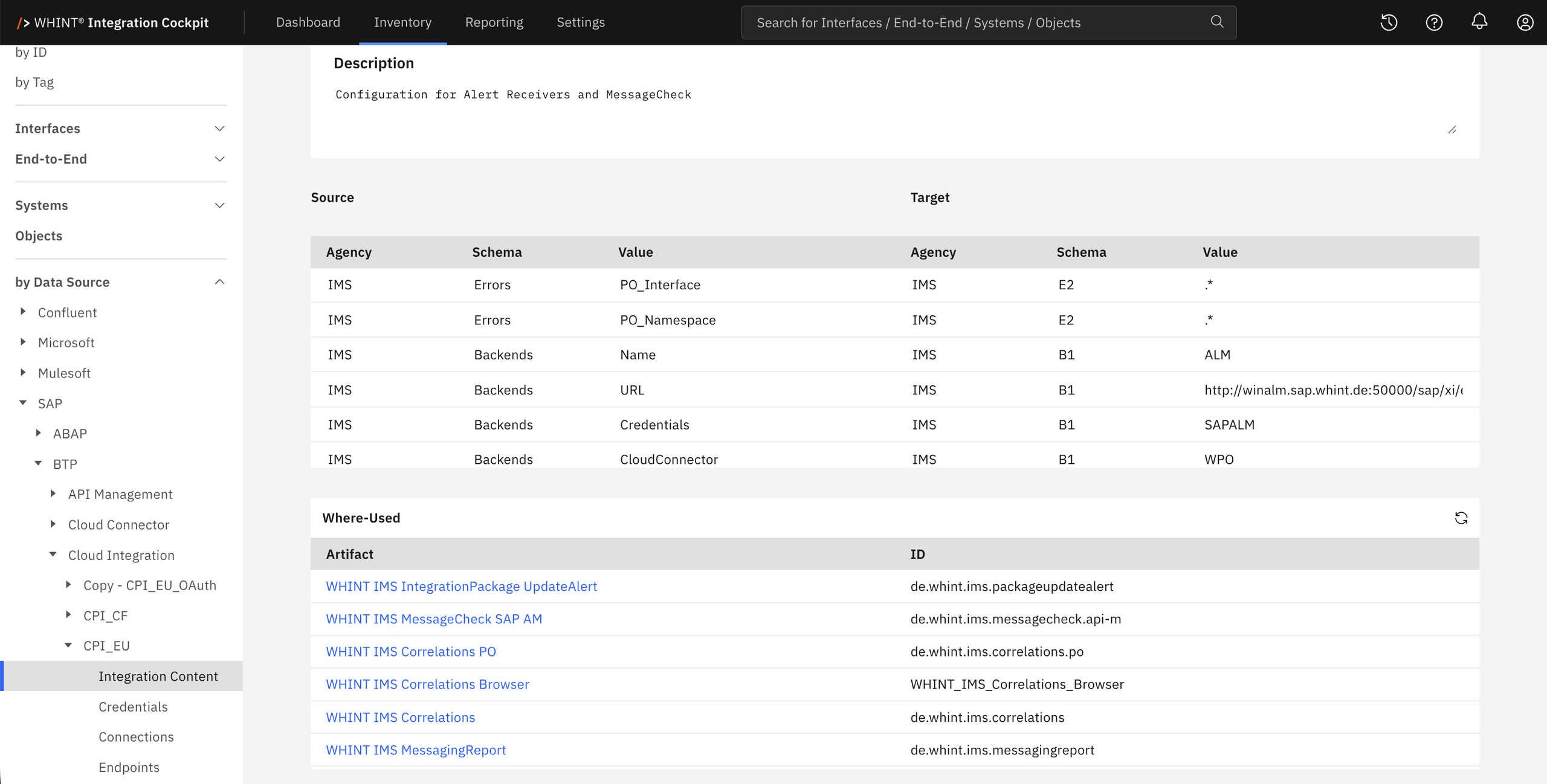
Open an integration flow’s detail view and you get the full picture in one place: Basic Data, Administration, the flow’s own description and metadata, its Connections (participant, protocol type, address), its Configuration parameters — and a Resources section listing every Message Mapping, Value Mapping, Script Collection and Credential that flow actually pulls in, each one clickable through to its own object page.
Flip that around, and it works the other way too. Open a Script Collection and you see which Groovy scripts it contains, whether each one is actually referenced anywhere, and — for a given Groovy script — which artifacts consume it. Open a Credential and, instead of just a username and a deployment timestamp, you can trace forward to the Channels and scripts that depend on it. That matters for more than governance: knowing exactly which iFlows go dark if a credential is rotated or revoked is a straightforward security question that’s genuinely hard to answer from Cloud Integration alone.
The same idea extends past Cloud Integration. On the classic ABAP side, the Cockpit builds an equivalent where-used view for RFC destinations, so you can see which are actually wired into IDoc, SOAP or XI-based interfaces — and flag single, standalone destinations that aren’t feeding a known interface at all.
From “who uses this” to “can we remove this”
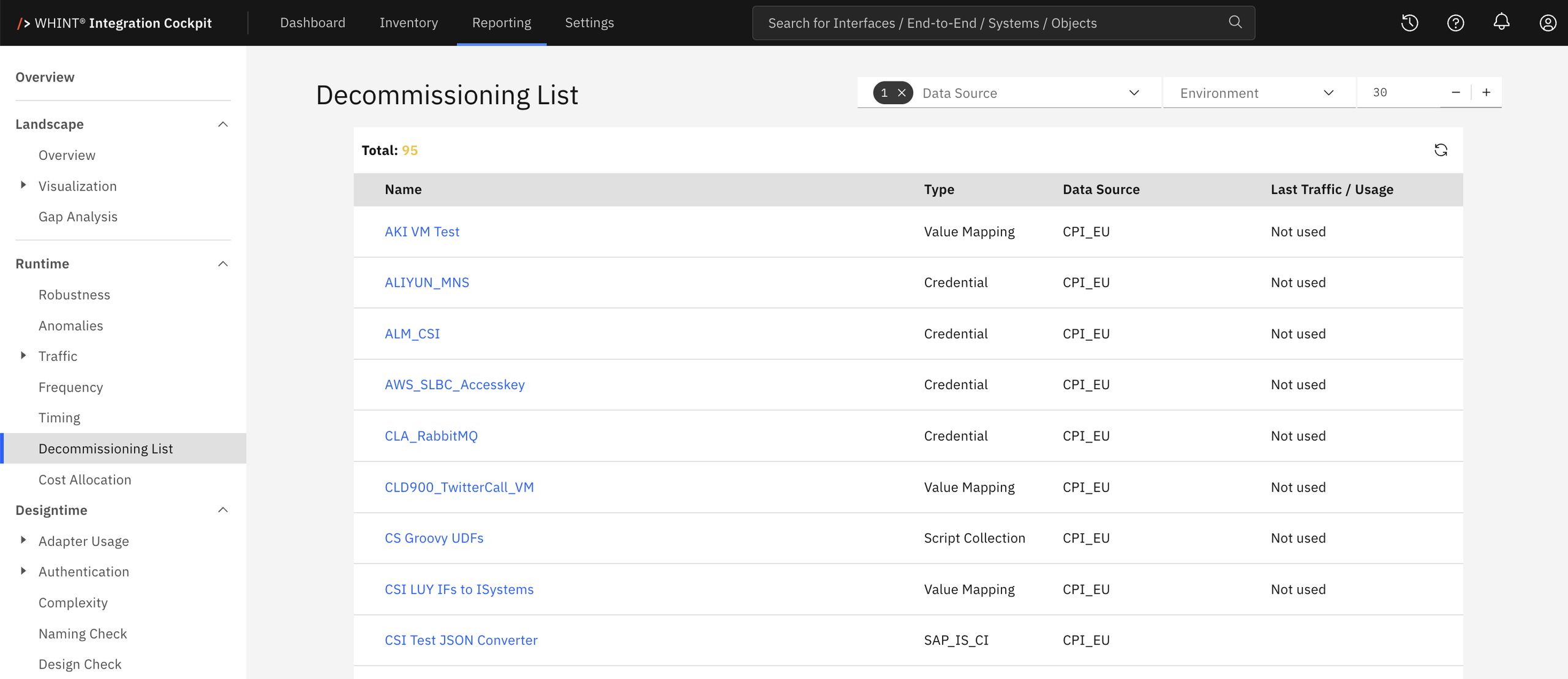
A where-used list is most valuable at the moment it comes back empty. If a Value Mapping, Script Collection or Credential has no where-used consumer anywhere in the landscape, that’s a decommissioning candidate — and the Cockpit treats it that way. Resources without any traced usage are surfaced directly in the Decommissioning List under Reporting, alongside the interfaces and objects that have gone quiet at runtime. It turns a manual, easy-to-postpone cleanup task into something the platform actively flags for you.
That closes the loop that started as a fairly narrow request — visibility into where a single Channel was used — into a landscape-wide capability: every resource type in Cloud Integration is traceable both forward (what does this iFlow depend on?) and backward (what depends on this object?), and the objects nobody depends on anymore get called out automatically.
Why this is worth caring about
None of this replaces good design discipline. But in any SAP Cloud Integration landscape that’s been running for more than a year or two, shared resources accumulate faster than anyone tracks them by hand. A where-used list turns three recurring pain points into a lookup instead of an investigation:
- Safe change management — know exactly which iFlows are affected before you touch a shared Script Collection or Value Mapping.
- Security hygiene — see every consumer of a credential before you rotate, restrict or remove it.
- Honest decommissioning — retire resources that genuinely have zero consumers, instead of guessing or leaving them in place indefinitely “just in case.”
If your integration landscape has grown past the point where anyone can answer “who uses this?” from memory, that’s usually the point where it’s worth having the platform answer it for you.
The WHINT Integration Cockpit provides landscape-wide discovery, documentation and governance across SAP and non-SAP integration platforms — including SAP Integration Suite, Cloud Integration, SAP Process Orchestration and SAP ABAP interfaces. Get in touch to see where-used lists and decommissioning reporting on your own landscape.
