
Last update: 15. Jul 2026
This article maps out SAP ABAP connectivity — which integration technologies are actually available, in which direction, and on which stack — as you move from classic SAP ECC to S/4HANA (Private and Public) or to the SAP BTP ABAP Environment. It is a companion to our earlier SAP Backend Integration Technologies Overview: where that piece introduced the technologies one by one, this one shows how the toolbox changes across the four ABAP generations, how each system connects to the outside world, and how we catalogue all of it. It is written for integration architects planning an S/4HANA move, and for IT colleagues who need a realistic picture before scoping a project.
Four ABAP stacks, one shrinking toolbox
“SAP ABAP” is not a single target anymore. From an integration point of view there are four relevant flavours, and the set of available technologies gets deliberately smaller as you move to the right:
- SAP ECC (ERP Central Component, the former R/3) and CRM/EWM/etc. on classic NetWeaver ABAP — the full, historically grown toolbox.
- SAP S/4HANA Private (on-premise / private cloud edition) — the ECC toolbox plus the newer additions: OData V4, RAP and native business events.
- SAP S/4HANA Public (Public Cloud edition) — a “clean core” world where only released APIs are exposed.
- SAP BTP ABAP Environment (Steampunk) — the greenfield ABAP-in-the-cloud runtime, with essentially the same API-only philosophy as S/4HANA Public.
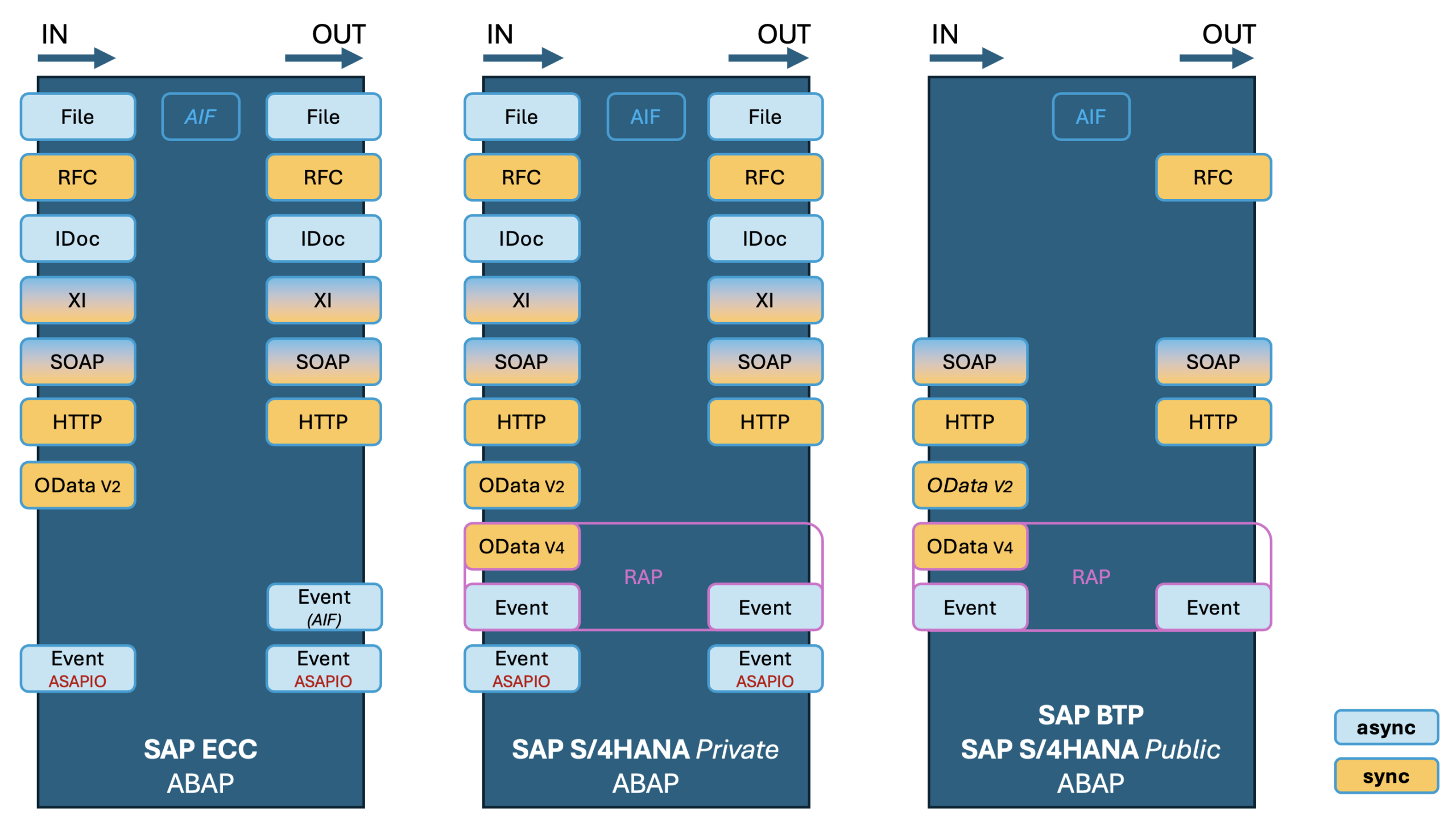
The single most important mental model for an S/4HANA project: the classic proprietary protocols (IDoc, RFC, XI proxy) survive on ECC and S/4HANA Private, but on S/4HANA Public and BTP the door narrows to modern, HTTP-based APIs — SOAP, REST, OData V4 and events — with RFC surviving only as an outbound path (typically through the Cloud Connector) to reach an on-premise system.
Availability overview by stack and direction (inbound/outbound)
| Technology | SAP NetWeaver (e.g. ECC) | S/4HANA Private | S/4HANA Public / BTP ABAP | Sync / Async |
|---|---|---|---|---|
| File (NFS / SFTP) | both | both | no | async |
| RFC / BAPI | both | both | outbound only | mainly sync |
| IDoc | both | both | no | async |
| ABAP Proxy (XI runtime) | both | both | no | sync + async |
| SOAP (WS runtime) | both | both | both | sync + async¹ |
| HTTP / REST | both | both | both | sync |
| OData V2 | inbound | inbound | inbound² | sync |
| OData V4 (RAP) | no | inbound | inbound | sync |
| Events (native / Event Mesh) | outbound³ | both | both | async |
| Events (ASAPIO add-on) | both | both | no⁴ | async |
¹ SOAP is synchronous by default and becomes asynchronous via WS Reliable Messaging. ² OData V2 inbound remains for released services in S/4HANA Public Cloud; new development on Public/BTP is expected in OData V4/RAP. ³ On ECC there is no native event engine — outbound eventing is achieved with the ASAPIO Event Enablement add-on or an AIF-based outbound pattern. ⁴ On Public/BTP the third-party add-on is not applicable; native events cover the broker use case.
The technologies in one line each
- File — Flat-file exchange over NFS or SFTP. Never a first-class integration technology (we said as much here), but it persists in the classic stacks and disappears on Public/BTP.
- RFC / BAPI — The oldest programmatic door into ABAP, using RFC-enabled function modules. Still the workhorse for tightly coupled SAP-to-SAP calls; on Public/BTP it only survives outbound, usually via the Cloud Connector to an on-premise system.
- IDoc — Standardised, hierarchical business documents (header + business segments), the most mature asynchronous engine SAP has. Native to ECC and S/4HANA Private; not exposed on Public/BTP.
- ABAP Proxy (XI runtime) — SOAP over the XI 3.0 message protocol, designed to talk to SAP PI/PO or Cloud Integration. Especially useful for multipart messages (e.g. a message carrying a PDF attachment).
- SOAP (WS runtime) — Standards-based web services configured through SOA Manager. One of the few classic technologies that carries all the way through to Public/BTP.
- HTTP / REST — A request handler in the Internet Communication Framework (ICF) accepting XML or JSON via GET/POST/DELETE. Synchronous request/response; available on every stack.
- OData — A REST-style protocol registered in the SAP Gateway. V2 is the established version; V4 arrives with S/4HANA and is produced through the RAP (RESTful Application Programming) model, which also generates OData V4 services and RAP business events from CDS.
- Events — Publish/subscribe messaging to a broker. S/4HANA ships native business events out of the box (to SAP Event Mesh, Advanced Event Mesh / Solace, and via ASAPIO add-on to Kafka, Azure Service Bus and others). On ECC, the same broker connectivity is achieved with the ASAPIO Event Enablement add-on.
How these systems actually connect
Listing the protocols is only half the story — the other half is what sits on the other end. Across the stacks the same middleware pattern repeats, and it is worth naming the players explicitly:
- SAP PO (Process Orchestration) — the on-premise middleware for the classic world (and itself heading toward end of maintenance, which is a large part of why these migrations are happening).
- SAP CI (Cloud Integration, part of the SAP Integration Suite) — the cloud successor for A2A, B2B and B2G scenarios.
- Other / direct — third-party middleware (Azure/MuleSoft/…)), or a point-to-point connection with no integration component in between.
- Event brokers — SAP Event Mesh (EM), SAP Advanced Event Mesh (AEM, Solace-based), and through ASAPIO add-on to the non-SAP brokers such as Kafka and Azure Service Bus.
- File transport — NFS and SFTP endpoints for the file lane.
A special case is SAP2SAP: two ABAP systems talking directly to each other over RFC, IDoc, XI proxy or SOAP without external middleware. This is the tightly coupled path — convenient, but exactly the kind of hidden point-to-point coupling that an interface inventory is meant to surface.
S/4HANA Public and BTP: the API-only reality
It is worth calling out the Public Cloud / BTP picture on its own, because it is where most migration surprises live. The available surface shrinks to:
- Inbound: SOAP, HTTP/REST, OData V4 (and released OData V2 services), and events.
- Outbound: RFC (to reach on-premise SAP via the Cloud Connector), SOAP, HTTP/REST and events.
- Gone: File, IDoc and XI-runtime proxies as first-class inbound options, along with the ASAPIO add-on.
In S/4HANA Cloud the surrounding terminology is the Communication Scenario (the released capability), the Communication Arrangement (the concrete configuration of a scenario against a remote system, including host, URL and credentials) and the Communication User that authenticates it. Only OData, SOAP and REST APIs are supported, and the catalogue of what exists is published on the SAP Business Accelerator Hub. SAP’s own reference for the cloud connectivity model is the ABAP integration and connectivity guide.
Monitoring the lot: SAP AIF
Different technologies land in different monitors — IDocs in WE02/BD87, proxies in SRT_MONI/SXMB_MONI, OData in the gateway error log, and so on. The SAP Application Interface Framework (AIF) is SAP’s attempt to give business users and operations one unified place to monitor and reprocess messages across those technologies. In practice, though, teams still work across two layers.
Two jobs in one framework
- Monitoring & error handling (business user) — a central cockpit that abstracts away the interface technology and its technical errors, focuses on the business meaning of a message, and automatically assigns failed messages to the responsible business user.
- Interface development (developer / architect) — a separate ABAP layer for functional, technology-independent interface logic, built through Customizing and reusable modules rather than one-off code.
Where AIF has a modern UI — and where it doesn’t
| Activity | UI available |
|---|---|
| Message monitoring (business user) | Fiori |
| Message monitoring (expert / admin) | Fiori |
| Assign recipients, configure value mappings | Fiori |
Interface definition & customizing (/AIF/CUST) | SAP GUI only |
Classic error handling (/AIF/ERR) | SAP GUI / Web Dynpro |
| Automatic reprocessing setup | SAP GUI only |
| ABAP development for checks / actions | SAP GUI / Eclipse |
The layered monitoring reality
| Layer | Tool | Coverage |
|---|---|---|
| Business message monitoring | AIF Fiori apps | All technologies, unified view |
| IDoc technical monitoring | WLF_IDOC Fiori app / WE02 | IDoc-specific status codes and segments |
| SOAP / Proxy technical monitoring | SRT_MONI (SAP GUI) | Web service runtime details |
| OData error log | /IWFND/ERROR_LOG (SAP GUI) | OData gateway errors |
One licensing note worth keeping in mind: standard AIF (per SAP Note 2293938) covers only standard SAP APIs. Custom interfaces and custom monitoring engines fall outside that scope.
| Channel | Scope & licensing |
|---|---|
| S/4HANA Cloud Public Edition | All communication scenarios are AIF-enabled. Essentials edition = monitoring of pre-delivered LoB content only. No custom AIF interfaces, no separate licensing. |
| S/4HANA Cloud Private / On-Premise | Full range of AIF features for pre-delivered content. Custom interface development requires the AIFGEN installation and licensing. |
| Add-On for SAP ERP / Business Suite | Selected features backported to the AIF add-on (for example, feature pack 3 of add-on 4.0, SAP Note 2608789). |
Cataloguing it all: from technology to Interface Type
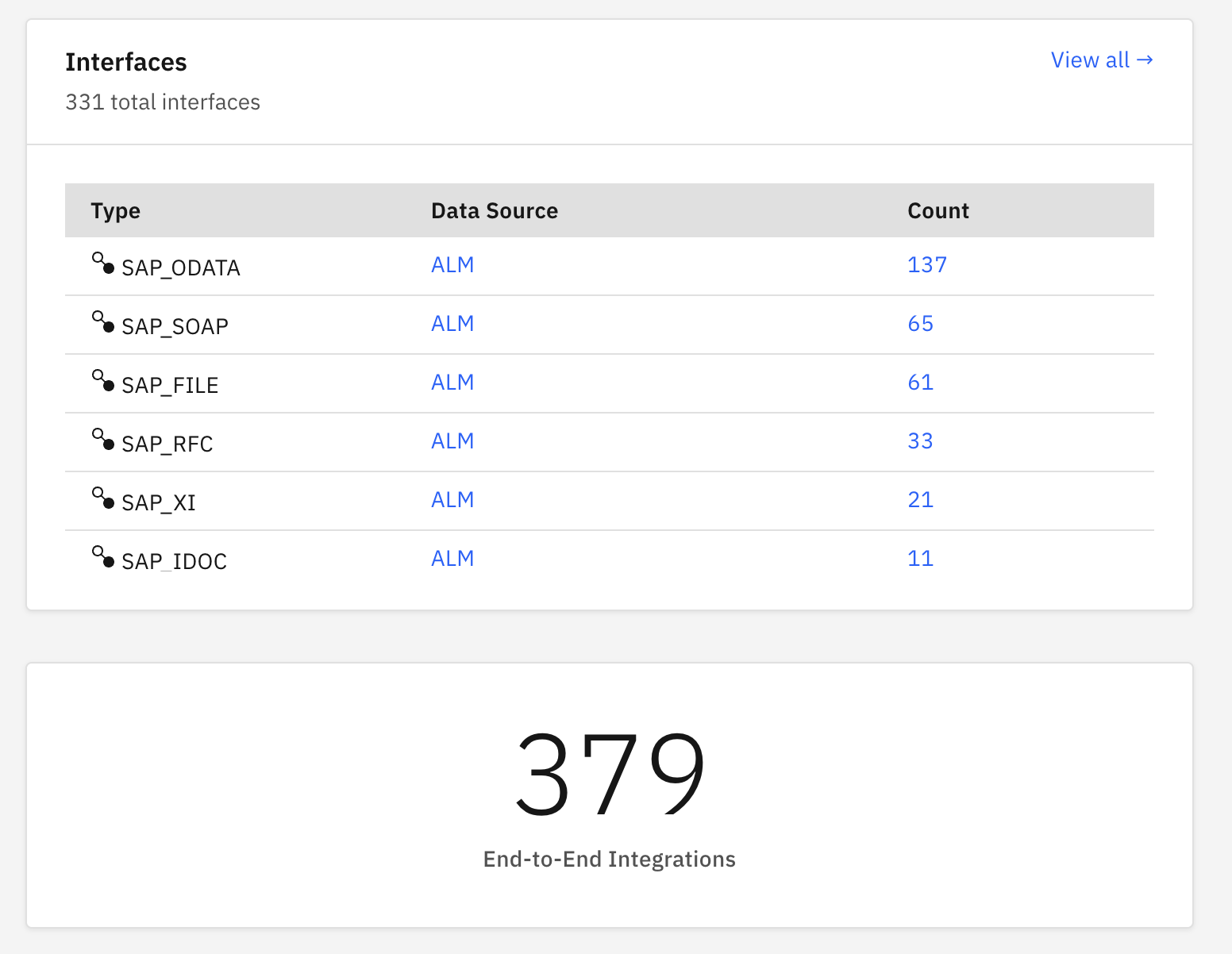
Knowing the technologies is one thing; keeping a live inventory of every interface that actually exists in a landscape — across four stacks, two directions and half a dozen middleware options — is another. This is exactly what we model in the WHINT Integration Cockpit, where each technology maps to a normalised Interface Type so that heterogeneous interfaces can be inventoried, documented and governed side by side:
| Technology | Interface Type |
|---|---|
| File | SAP_FILE |
| RFC / BAPI | SAP_RFC |
| IDoc | SAP_IDOC |
| ABAP Proxy (XI) | SAP_XI |
| SOAP | SAP_SOAP |
| OData V2 / V4 | SAP_ODATA |
| HTTP / REST (inbound) | SAP_ICF |
| Outbound destinations (RFC / HTTP / event) | SAP_RFC |
| Events (ASAPIO) | SAP_ASAPIO |
| Communication Arrangements | SAP_COM |
Around those ABAP resources sit the platform-side objects that complete an end-to-end interface: Cloud Connector entries on the SCC side; Credentials, Value Mappings, Message Mappings and Script Collections on the SAP Integration Suite (Cloud Integration) side; Destination entries on SAP BTP; and, on the ABAP System itself, the Communication User that ties an inbound interface to an identity. Modeling each of these as a first-class resource is what lets the Cockpit reconstruct a complete interface — sender, protocol, middleware and receiver — rather than a disconnected list of technical objects.
When to use which — and what’s next
The honest architect’s answer is “it depends on the stack you are on.” On ECC and S/4HANA Private you still have the whole toolbox and can choose the technology that best fits the coupling, volume and payload. On S/4HANA Public and BTP the choice is largely made for you: modern APIs and events, with RFC reserved for reaching back to on-premise SAP. The real work is inventorying what you already run so that a migration doesn’t quietly drop an interface no one remembered.
If you need a catalogue of your existing SAP backend interfaces across all four stacks, that is precisely what our inventory and documentation capabilities are built for — see the WHINT Integration Cockpit.
