
Interface documentation for SAP Cloud Integration should not be written by hand. With the WHINT Integration Cockpit, every discovered integration flow is documented in Atlassian Confluence or in a Word document in Microsoft SharePoint, generated from what is actually deployed. And with a naming convention for your integration packages, you decide where each interface’s documentation lives — without touching a single iFlow.
Why iFlow documentation goes stale
Most integration teams know the pattern. An iFlow goes live, someone writes a specification in Confluence or Word, and from the next change onwards the document and the tenant drift apart. Externalized parameters change, a mapping gets a new field, a receiver moves to another system — and nobody updates the page.
The result is documentation that support teams stop trusting, onboarding that starts with reverse-engineering, and audits that turn into a scramble. The fix is not more discipline. It is to generate the technical part of the documentation from the as-is state of the tenant, and to put it where people already look: the Confluence space or the SharePoint library the business and AMS teams use every day.
How the Integration Cockpit documents Cloud Integration flows
The Integration Cockpit treats documentation as an output of its inventory, not as a separate project. Three steps run on every load:
- Discover. The SAP Integration Suite data source reads packages, iFlows, value mappings and other artifacts from the Cloud Integration tenant into the raw data area.
- Normalize and enrich. Each iFlow becomes an interface in the inventory with standardized fields. Sender and receiver are harmonized against the system catalog, and the interface carries tags and properties — your own, or extracted automatically.
- Publish. For each interface, the Cockpit creates or updates a documentation target: a page in Atlassian Confluence or a Word document in a Microsoft SharePoint library.
The generated page is built from the deployed artifact, so it shows what is running, not what was planned. For Cloud Integration flows, recent releases have added these building blocks to the Confluence page:
| Content on the page | Where it comes from |
|---|---|
| Interface metadata, sender and receiver | Inventory record, harmonized against the system catalog |
| Sender and receiver system properties | System properties maintained or extracted in the Cockpit |
| BPMN diagram of the integration process | The iFlow model |
| Table of all flow steps of the iFlow | The iFlow model, step by step |
| Externalized parameters with their configured values | The iFlow configuration on the tenant |
| Value mapping table | Value mapping artifacts |
| Message mapping structure | Message mappings used by the iFlow |
The flow steps table is what turns the BPMN picture into something a support engineer can work with. Every step of every integration process in the iFlow — senders, receivers, routers, content modifiers, mappings, scripts, request-replies — is listed in processing order with its name, type and settings. Instead of opening the iFlow editor and clicking through each shape, a reader sees the complete processing sequence on one page and can search it.
Confluence Cloud and self-hosted Confluence are both supported. On the Microsoft side, the same interface content lands as a Word document in SharePoint, which suits organizations whose specifications, sign-offs and audit evidence already live in Microsoft 365.
The open question for every team is the same: which Confluence page or which SharePoint document belongs to which interface? That is where the package name comes in.
Documenting on package level with tag extraction
In Cloud Integration, the integration package is the natural unit of ownership. One package usually maps to one business scenario, one application pair or one team — and so to one Confluence space or one SharePoint folder. Maintaining a documentation location on every single iFlow would be tedious and error-prone. Maintaining it once on the package is not.
Tag extraction in the Integration Cockpit reads the name of each integration package during discovery and applies a regular expression to it. The parts the regex captures become tag values, and those tags are set on every interface in the package. The package is named once; each iFlow inherits the values.
This works because most teams already encode ownership in the package name. A convention such as <Domain>_<Description> gives the regex everything it needs. With the expression below, the captured group becomes the tag Domain (convention, regex and values are illustrative):
^([A-Z]+)_| Package name | Domain |
|---|---|
| FIN_Accounts Payable | FIN |
| FIN_Treasury | FIN |
| HR_Payroll | HR |
| LOG_Warehouse Management | LOG |
Because the values come from the name, there is nothing extra to maintain in the tenant. And because they sit on the interface as regular Cockpit tags, you can filter the catalog by them, use them in to-do lists, and — the important part for this post — use them to build properties.
Property extraction by tag: building the documentation URL
Property extraction by tag takes the tag values an interface carries and writes them into a property. For documentation, the property is the documentation URL: the address of the Confluence page or SharePoint document that holds this interface’s documentation. The sync then uses that property as its target.
The rule is defined once, as a template that combines fixed parts with tag values. Because the documentation is organized by domain, the domain is the last level of the URL, followed by the page or Word file that holds the documentation. The placeholder notation below is illustrative; the principle is what matters.
Confluence:  https://acme.atlassian.net/wiki/spaces/INTEGRATION/{Domain}/Interface-Documentation
SharePoint:  https://acme.sharepoint.com/sites/Integration/Interfaces/{Domain}/Interface-Documentation.docx
For an iFlow AP_Invoice_Coupa_to_S4 in the package FIN_Accounts Payable, tag extraction sets Domain = FIN. Property extraction then fills the property Documentation URL with an address that points to the documentation page or file under FIN. Every iFlow in every FIN package — Accounts Payable, Treasury and any package added later — gets the same URL, so the FIN page or document collects the documentation of all interfaces in the domain, automatically, on the next load.
Three things follow from this design:
- One change, many interfaces. Move a package to another domain by renaming it according to the convention. All its interfaces get new URLs and are synced to the new location.
- New iFlows are covered from day one. A developer who adds an iFlow to an existing package does nothing extra; the package name already says where its documentation goes.
- Exceptions stay possible. Where a single interface needs a different home, you can override its tag or property in the Cockpit without touching the package.
Walkthrough: from package name to one document per domain
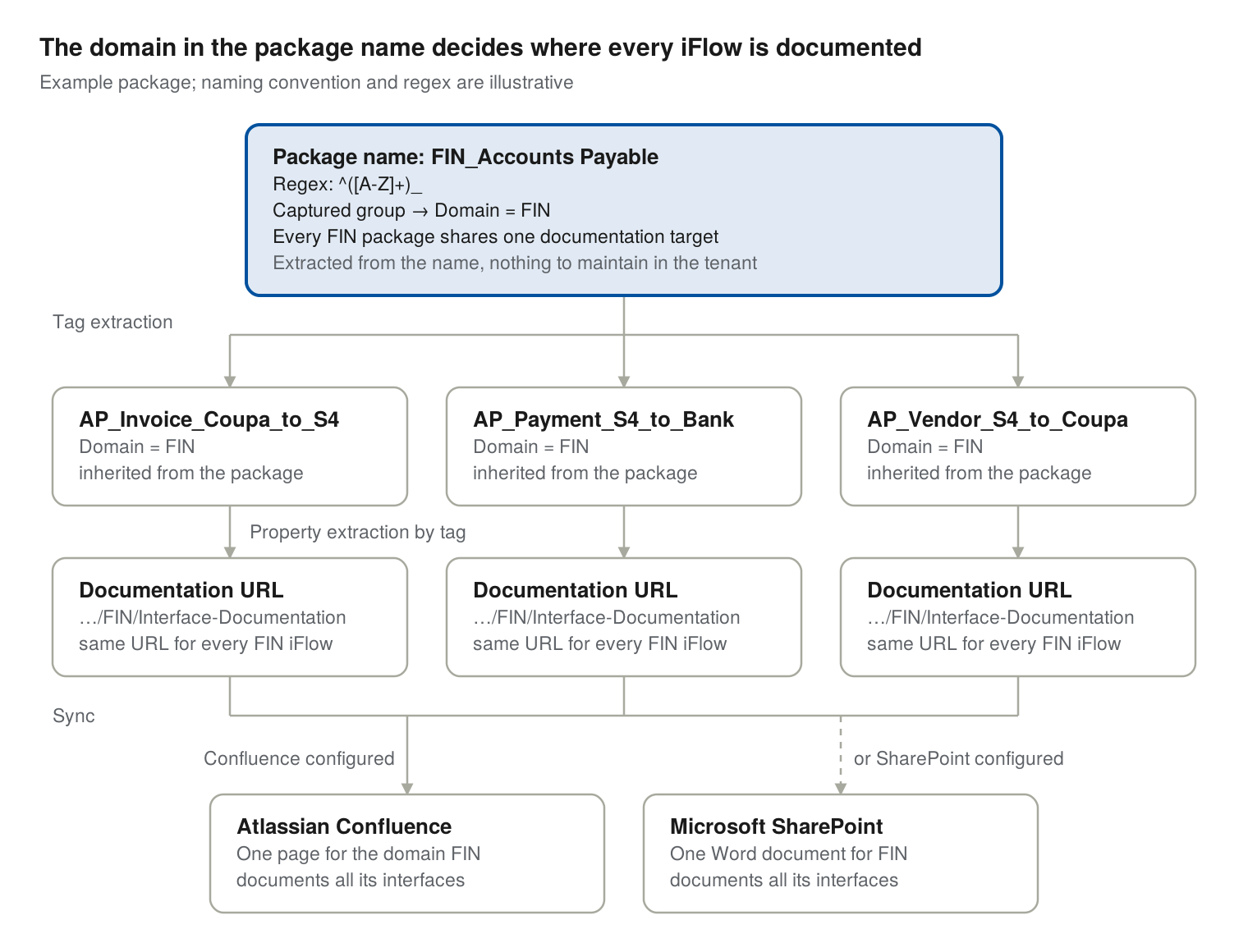
The package name is the single input. Tag extraction applies the regex to it and copies Domain onto each of the three iFlows, property extraction by tag turns it into the documentation URL of the FIN domain, and the sync writes all three interfaces into that one page in Confluence or that one Word document in SharePoint, depending on which documentation target is configured.
Conventions that keep it working
The mechanism is simple; the conventions decide whether it stays clean after two years and a few hundred packages.
- Fix the naming convention and the regex before the first package. Every package that does not match the pattern gets no tags and therefore no documentation URL. Write the convention down, and make it part of the package creation checklist.
- Keep domain codes stable. The domain code ends up in the URL. Agree on a short, fixed list of codes, and treat renaming a domain as moving its documentation.
- Make the extracted tag mandatory. A to-do configuration in the Cockpit can flag interfaces that lack
Domain— a sign that their package name breaks the convention — so gaps show up in the catalog instead of in an audit. - Separate generated and hand-written content. Let the Cockpit own the technical part of the page. Put the business context — purpose, owners, SLAs, error handling agreements — in the package and iFlow descriptions, or in a section the sync does not overwrite.
- Exclude what should not be documented. Test and template packages can carry an ignore tag so they never create pages or documents.
- Decide per environment. Usually only production interfaces are documented. Development and test tenants feed the inventory but not the documentation space.
From package names to living documentation
Good interface documentation is current, findable and cheap to maintain. Generating it from the tenant takes care of current. Syncing it into Confluence or SharePoint takes care of findable. And deriving the documentation URL from the package name takes care of cheap: one naming convention replaces a manual decision per iFlow.
If you want to see the flow with your own Cloud Integration tenant — from package names to a Confluence page or a SharePoint Word document per domain — get in touch with the WHINT team.
Sources
- Integration Cockpit Version 2620 — BPMN diagram, external parameters and system properties on Confluence pages
- Integration Cockpit Version 2625 — self-hosted Confluence, value and message mapping tables, package regex filter for system generation
- Integration Cockpit Version 2634 — tag extraction and ignore tags
- Inventory in Integration Cockpit — discovery, normalization and enrichment with tags and properties