
Ask two people which system is the “sender” of an interface and you may get two different answers — and both can be right. The integration developer looks at who opens the connection. The business owner looks at whose data is moving. In a small landscape the difference is academic. In a landscape with hundreds of iFlows, it decides whether your impact analysis is correct.
The WHINT Integration Cockpit therefore separates three things that are often collapsed into one: the technical role of a system (sender or receiver), its business role (provider or consumer), and the dataflow direction (outgoing or incoming). This post walks through the three basic patterns where these perspectives meet — and where they diverge.
Two lenses on the same interface
Every interface can be described twice: once by how the message travels, once by where the data comes from.
Sender / Receiver — the technical lens. The sender initiates the communication; the receiver is called. In SAP Integration Suite this maps directly onto the iFlow: the sender channel is where a message enters, the receiver channel is where the iFlow calls out. This is what you read from configuration and runtime data.
Provider / Consumer — the business lens. The provider owns the data (it is the system of record); the consumer needs it. This view answers questions like “which processes break if this system is down?” and is the language of enterprise architecture.
Dataflow direction — the bridge. It states whether the data travels with the call (outgoing) or comes back against it, in the response (incoming). Once you know the direction, you can derive the business roles from the technical ones.
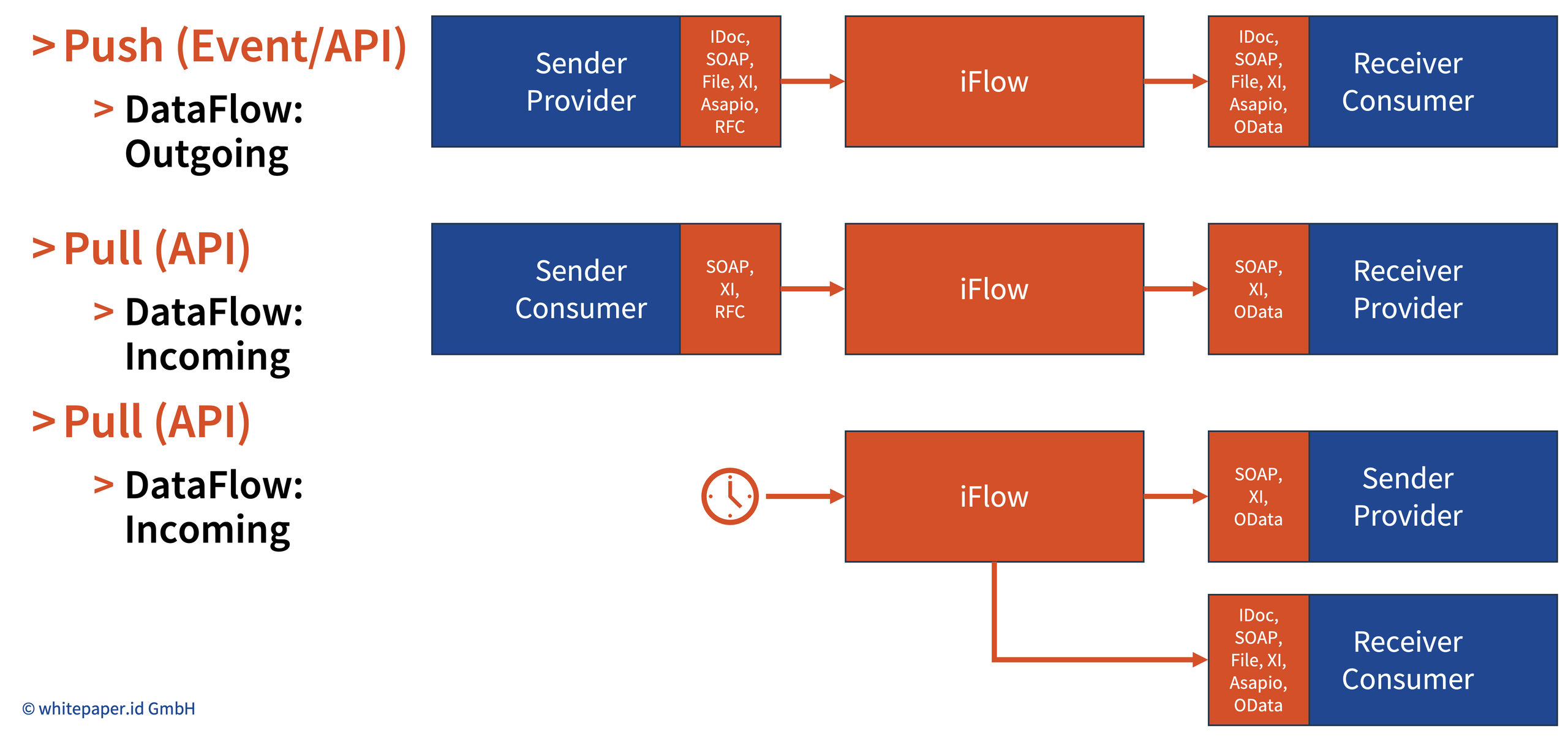
The schema above shows the three patterns that cover almost every point-to-point scenario routed through an iFlow. The same applies for a sequence of iFlows/Interfaces across an End-to-End Integration.
Pattern 1: Push — dataflow outgoing
In a push, both lenses agree: the sender is the provider, the receiver is the consumer.
The providing system decides when data moves — typically on a business event such as a posted delivery or a changed material. It hands the payload to the iFlow via IDoc, SOAP, File, XI, ASAPIO or RFC. The iFlow maps and routes it to the consuming system via IDoc, SOAP, File, XI, ASAPIO or OData.
The data travels in the same direction as the call, so the dataflow is outgoing. Push is also asynchronous-friendly: fire-and-forget adapters like IDoc and File only ever appear on push legs.
Pattern 2: Pull — dataflow incoming
In a pull, the lenses flip: the sender is the consumer, the receiver is the provider.
The consuming system needs data and asks for it — a price lookup, an availability check, a customer master read. It calls the iFlow synchronously via SOAP, XI or RFC. The iFlow calls the providing system via SOAP, XI or OData and returns the response.
The call goes from consumer to provider, but the data comes back the other way. The dataflow is incoming from the sender’s point of view. An inventory that only records “sender → receiver” would draw this arrow backwards from a business perspective.
Pattern 3: Scheduled Pull — the tricky one
In a scheduled pull, the iFlow itself is the initiator, and the provider sits on a receiver channel while acting as the business sender.
No system triggers the flow; a timer does. The iFlow calls the providing system via SOAP, XI or OData and fetches the data — an incoming dataflow. It then pushes the result to the consuming system via IDoc, SOAP, File, XI, ASAPIO or OData.
This is where purely technical inventories go wrong. Read from the iFlow configuration, both systems are receivers, and there is no sender at all. Read from the business perspective, there is a clear path: provider → consumer. That is why the schema labels the fetched system “Sender / Provider” even though it is technically called, not calling. Resolving this requires knowing the dataflow direction of each receiver channel, not just its existence.
Why the Integration Cockpit keeps both perspectives
The Cockpit records the technical view as discovered and derives the business view from the dataflow direction — so neither audience has to translate.
- Integration teams work in sender/receiver terms. That is what the iFlows, channels and runtime logs show, and it is what they need for monitoring and troubleshooting.
- Enterprise architects work in provider/consumer terms. EA tools such as SAP LeanIX model interfaces as data provided by one application and consumed by another, so a correct export depends on the business roles, not the channel roles.
- Impact analysis only works in business terms. “Who is affected if this system’s data is wrong or unavailable?” follows the provider → consumer path, which runs against the call in every pull scenario.
- End-to-end integrations stay readable. When a chain of interfaces is combined into one E2E integration, a consistent provider → consumer direction lets you read the business flow left to right, regardless of which hop was push and which was pull.
The takeaway
Sender and receiver tell you who calls whom; provider and consumer tell you whose data it is — and the dataflow direction tells you how to get from one to the other.
| Pattern | Trigger | Sender is… | Receiver is… | Dataflow | Typical adapters (sender → receiver) |
|---|---|---|---|---|---|
| Push (Event/API) | Business event in the provider | Provider | Consumer | Outgoing | IDoc, SOAP, File, XI, ASAPIO, RFC → IDoc, SOAP, File, XI, ASAPIO, OData |
| Pull (API) | Request from the consumer | Consumer | Provider | Incoming | SOAP, XI, RFC → SOAP, XI, OData |
| Scheduled Pull (API) | Timer in the iFlow | iFlow (timer) | Provider (fetch), then consumer (deliver) | Incoming, then outgoing | Timer → SOAP, XI, OData; then IDoc, SOAP, File, XI, ASAPIO, OData |
If your landscape documentation only has one “direction” column, it is almost certainly wrong for every pull scenario. Keeping both perspectives — and the direction that links them — is what turns an interface list into a map of how your business actually moves data.
