
Every transformation project asks the same first question: which interfaces do we actually have? Whether you are moving from SAP ECC to S/4HANA, migrating SAP PO to SAP Integration Suite, or consolidating systems after a merger, the answer decides scope, budget and risk.
Yet in most organizations, that answer lives in a spreadsheet that someone filled in by hand, months ago. This post shows why that approach breaks down in transformation projects, and how the WHINT Integration Cockpit replaces it with an interface list that builds and maintains itself.
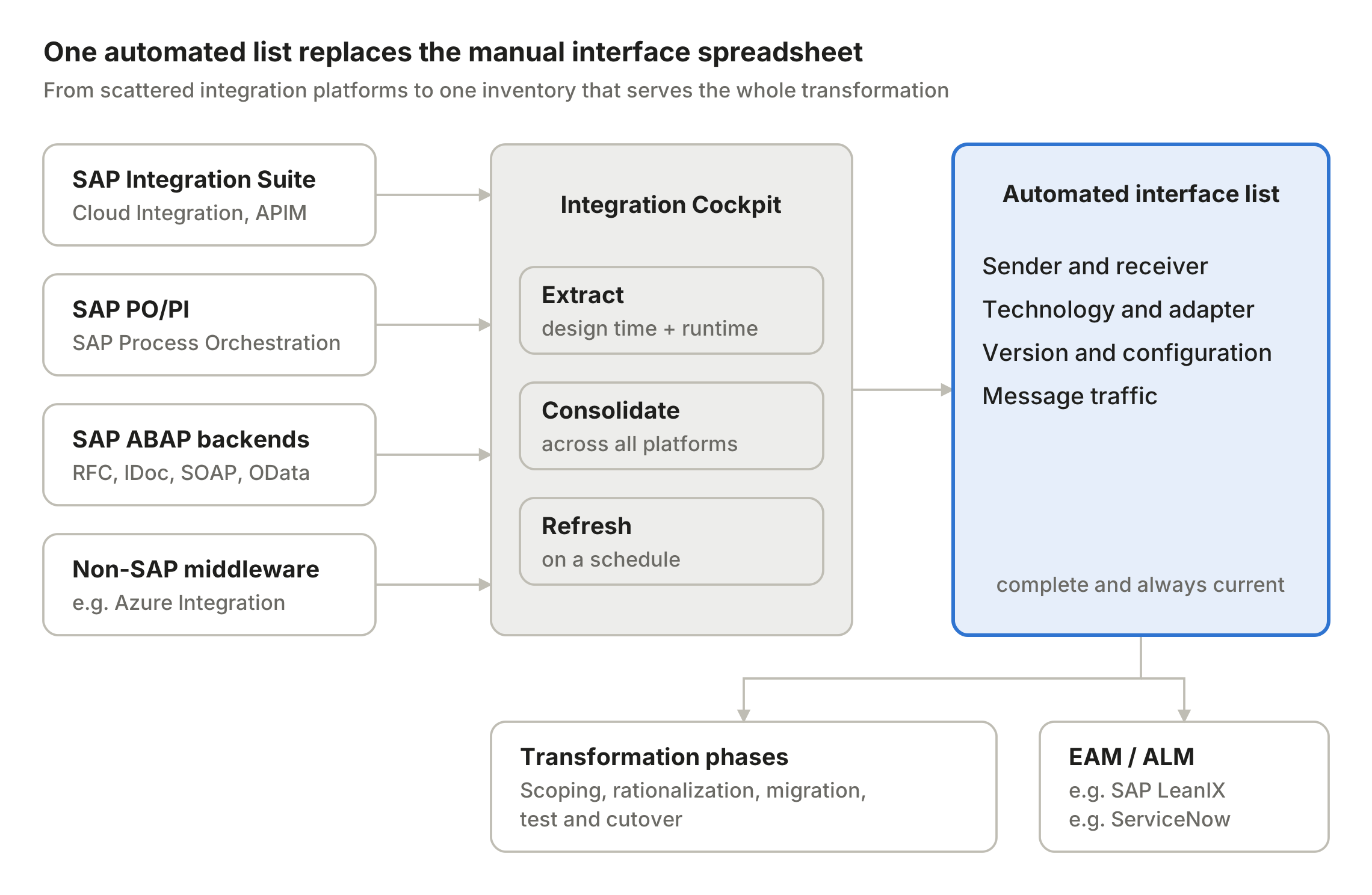
The Cockpit reads interfaces from every integration platform and turns them into one list that drives the project and feeds enterprise architecture.
Why the Excel interface list fails in transformation projects
A manually maintained interface list is outdated the day it is finished. In a transformation project, that gap becomes expensive, because every missed interface surfaces later as a test failure or a cutover incident.
The typical weaknesses:
- It is incomplete. Interfaces are spread across SAP PO/PI, SAP Integration Suite, ABAP backends (RFC, IDoc, SOAP, OData), AIF and non-SAP middleware. Nobody has a full view of all of them, so the list reflects whoever was asked, not what is running.
- It has no usage data. A spreadsheet cannot tell you whether an interface processed a million messages last month or none at all. Without that, you migrate interfaces that should have been retired.
- It goes stale during the project. Transformation programs run for months or years. Interfaces are added, changed and switched off while the inventory sits unchanged.
- It ties up experts. Collecting and reconciling the list costs integration specialists weeks of work, exactly when they are needed for design and build.
How the Integration Cockpit builds the list for you
The WHINT Integration Cockpit reads the interface inventory directly from the systems where integrations live, instead of asking people to describe them. The result is one consolidated interface list across the whole landscape.
- Connect the sources. The Cockpit discovers interfaces from SAP Integration Suite (Cloud Integration, API Management, Event Mesh), SAP PO/PI, SAP ABAP backends and non-SAP platforms such as Microsoft Azure Integration Services.
- Extract design-time and runtime data. For each interface it captures sender, receiver, technology, adapter, version and configuration, plus the actual message traffic.
- Consolidate and classify. Technical artifacts from different platforms are merged into a single view, so an end-to-end flow across PO, a backend IDoc and a cloud API appears as one interface, not three disconnected entries.
- Refresh automatically. Extraction runs on a schedule. The list reflects the landscape as it is today, not as it was at project kick-off.
The outcome is the list every transformation team wants but rarely has: complete, current, and enriched with usage data.
One list, every project phase
An automated interface list is not a one-off deliverable. It supports each phase of the transformation with the same, always-current data.
| Phase | Key question | What the automated list delivers |
|---|---|---|
| Assessment & scoping | How big is the integration effort? | A complete count of interfaces by system, technology and complexity, as the basis for estimates |
| Rationalization | What can we drop? | Traffic data reveals interfaces with no messages, candidates to retire instead of migrate |
| Migration planning | What moves where, and in which wave? | Technology and adapter details show which interfaces need redesign (e.g. deprecated adapters, point-to-point RFCs) |
| Build & test | Did we cover everything? | A reference list to derive test cases and track migration status per interface |
| Cutover | Is the target landscape complete? | Comparison of source and target landscapes to catch missing deployments or transports |
The biggest lever is usually rationalization. Every interface that is retired rather than migrated saves design, build and test effort, and it is the traffic data that makes this decision defensible.
Beyond go-live: an inventory that stays alive
Most interface lists die with the project that created them. Because the Integration Cockpit keeps extracting, the list continues to serve operations and governance after go-live.
It also feeds the tools your architects already use. Interface data can be synchronized into SAP LeanIX as interface fact sheets or into ServiceNow, so enterprise architecture reflects the real landscape instead of a manually curated model. The next transformation, and there is always a next one, starts with an inventory that already exists.
Conclusion
Transformation projects succeed or fail on the details nobody wrote down. An automated interface list turns the first question of every project, “which interfaces do we have?”, from weeks of manual collection into a report that is ready on day one and stays current until the last cutover.
Planning an S/4HANA move, a PO migration or a landscape consolidation? Talk to the whitepaper.id team and see your own interface list generated from your landscape.